

Key Takeaways
- A useful 404 page explains the issue plainly and immediately, without adding to a visitor’s stress.
- Visitors need clear recovery options — including home, practice area search, and a way to contact the firm.
- Accessibility, fast loading, and correct HTTP status codes are essential, and carry extra weight for law firms given the volume of ADA website-accessibility litigation.
- Humor and visual flair can support the experience, but should never hide the next step or feel out of step with a firm’s tone.
- Analytics and routine link checks help reduce future dead ends, especially after a rebrand, merger, or attorney departure.
A missing page is a small but important moment in a potential client’s journey. Whether someone followed an outdated bookmark, clicked a broken link from a settlement-news article, or mistyped an address while searching for help after an accident, a thoughtful 404 page design can turn an abrupt stop into a useful path forward.
The goal is not to pretend that nothing went wrong. It is to explain the problem calmly, preserve trust, and help people find what they came for with as little effort as possible — which matters even more when the visitor may already be dealing with an injury, a legal deadline, or another stressful situation.
Why 404 Pages Matter for Law Firms in 2026
Broken URLs are normal on any site, but law firm websites accumulate them in some distinctive ways: practice area pages get restructured, attorney bio pages disappear after a departure or retirement, old case-result pages are retired for compliance reasons, and blog posts covering time-sensitive topics (a settlement, a change in state law) get archived or merged. Other sites and directories often keep linking to those old URLs long after they’re gone.
A 404 response simply means the requested resource was not found. It does not automatically mean the whole site is broken, but for a firm whose credibility is part of the pitch, a poorly handled error page can undercut the trust the rest of the site works to build.
What Visitors Need When a Page Is Missing
When visitors reach a missing URL, they are usually asking four simple questions: What happened? Did the website load correctly? Can I still find the information? What should I do next?
For a law firm site, that last question often has real urgency behind it — someone looking for a personal injury attorney after a car accident, or trying to confirm a filing deadline, doesn’t want to decode clever copy. “We can’t find that page” is clearer and more reassuring than an elaborate joke with no obvious action.
Core Elements of a Helpful 404 Page
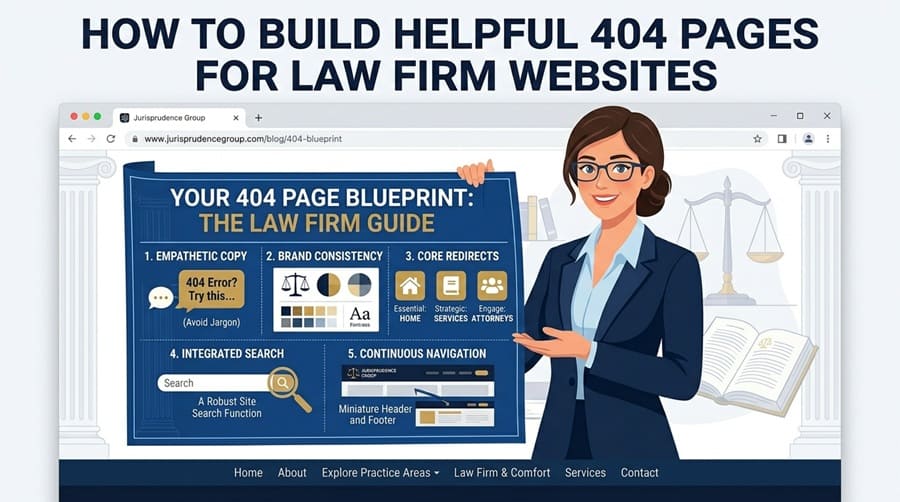
An effective 404 page does not need to be complicated. It needs a familiar structure, a direct explanation, and recovery choices that align with why people come to a law firm’s site in the first place.
- Use a prominent heading such as “Page not found.”
- Briefly explain that the requested page may have moved or no longer exists.
- Include a clear link or button leading to the homepage.
- Add a search field so visitors can find a practice area or blog post without guessing at the URL.
- Show a short list of high-value destinations — practice areas, attorney profiles, or a case-evaluation form.
- Make the phone number and a “contact us” or “free consultation” option easy to find, since that’s often the visitor’s actual goal.
Write Clear, Calm Error Copy
The best error copy is human, concise, and neutral. Avoid blaming language such as “You entered the wrong URL.” Visitors may have arrived via an old email, an outdated legal directory listing, or a link the firm controls.
Recommended copy traits
- Use plain language instead of server terminology.
- State the issue in the first sentence.
- Place one primary action close to the message.
- Match the reassuring, professional tone of the rest of the site — this is often someone’s first impression of the firm.
Copy to avoid
- Long technical explanations.
- Several equally prominent calls to action.
- Humor that makes the error unclear or feels flippant given why many visitors are on the site.
- Language that suggests the visitor caused the problem.
Give Visitors Useful Ways Forward
Choose recovery links based on why people visit the site. A personal injury firm might feature practice areas (car accidents, workplace injuries, wrongful death), a “free case evaluation” form, and recent case results. A firm with a broader practice, like land use or zoning, might send visitors to services, attorney bios, and a contact page. A larger multi-office firm could highlight office locations alongside practice areas.
Content-heavy sites with a large blog or resource library benefit from a visible search box, while smaller firm sites may do better with a home button and three or four highly relevant links (practice areas, attorney bios, contact). Keep normal site navigation available when possible so visitors don’t feel stranded on a separate error screen at a moment when they may already feel anxious.
Make the Page Accessible
A 404 page should be as usable as every other important page on the site. Use a logical heading hierarchy, descriptive link text, visible keyboard focus, and readable contrast. Search fields need clear labels, not placeholder text alone.
This matters more for law firms than for the average business: website accessibility is itself a frequent subject of litigation, and a firm’s own site being inaccessible is a particularly awkward liability. Test the page without a mouse and confirm visitors can reach the primary action, search field, and navigation in a sensible order. Avoid flashing effects, auto-playing media, and motion that distracts from recovery.
Use Visual Design With Purpose
A simple illustration, familiar colors, and generous spacing can reduce frustration and make the message easier to scan. Brand personality is welcome when it supports clarity — but for a law firm, that personality usually leans toward trustworthy and composed rather than playful. A lighthearted graphic can still work, provided it doesn’t compete with the page heading or primary action, and doesn’t read as dismissive to a visitor searching for help after an accident or a legal problem.
Avoid oversized images, heavy animation, dark low-contrast text, and novelty effects that delay loading. The visitor should see the explanation and the next step before any decorative detail.
Handle the Technical Details Correctly
Design alone cannot fix a faulty error experience. Missing pages must return a real 404 HTTP status, rather than a successful 200 status that merely looks like an error page (a “soft 404”), which can confuse search engines and reporting tools.
- Redirect a permanently moved page only when there’s a genuinely relevant replacement — for example, an old attorney bio redirecting to that attorney’s practice area rather than just the homepage.
- Use a 410 response for content that’s been permanently removed with no substitute, such as a retired case-result page.
- Keep the page lightweight so it loads quickly under poor network conditions, including on mobile.
- Repair broken internal links instead of relying on the error page as a permanent workaround.
Test and Improve the Experience
Review your 404 page monthly or quarterly, especially after redesigns, migrations, attorney departures, or practice area changes. Open old URLs on desktop and mobile, test every recovery link, and try keyboard-only navigation.
Then review analytics, server logs, and monitoring reports for frequently requested missing URLs. Look for patterns — an old marketing campaign link, a directory listing pointing to a retired page, or a navigation typo. Track meaningful recovery actions, including searches, homepage visits, practice-area clicks, consultation-form submissions, and successful returns to content.
A Simple 404 Page Checklist for Law Firm Sites
- Does the page clearly explain that the requested page is unavailable?
- Can visitors reach the homepage in one click?
- Is site search available for finding practice areas or blog content?
- Are the recovery links relevant to why people visit — practice areas, attorney bios, contact/consultation?
- Is the phone number or consultation form easy to find?
- Does the page work well on mobile and with keyboard navigation?
- Are text, controls, and focus indicators easy to perceive?
- Does the server return the correct 404 status?
- Are missing URLs monitored and broken links repaired?
Conclusion
A 404 page appears after something goes wrong, but it can still create a positive impression — which matters for a law firm whose entire pitch rests on being reliable and trustworthy. Keep it clear, fast, accessible, and focused on the visitor’s next step. When people can quickly recover from a missing page, they’re far more likely to keep exploring the site — and to call — instead of leaving for a competitor.